The factory that turns an idea into a shipped feature
Drop in a feature request. A team of AI workers plans it, writes the code, tests it, deploys a live preview you can click, and opens it up for a human to approve.
Every single step is checked before the next begins — nothing moves forward until the last thing is proven to actually work.
Turning an idea into shipped software is slow, manual, and easy to get wrong
When someone asks for a new feature, a lot has to happen by hand. Someone reads the request and figures out a plan. Someone writes the code. Someone tests it. Someone sets up a place to try it. Someone double-checks each step. Every handoff is a chance for things to stall — or for a mistake to slip through unnoticed until much later.
- 🐌A person reads the request and writes a plan — when they have time.
- ⌨️A developer writes the code by hand, often days later.
- 🔁Testing is a separate manual step that's easy to skip under deadline.
- 🚧Setting up a place to try the change live takes its own effort.
- 🕳️A broken step can slip through and only surface much later.
- ⚡AI workers plan, code, and test automatically, in minutes.
- ✅A quality check runs after every step — automatically, every time.
- 🌐A live preview is built and deployed for you to click and try.
- 🛑If any step fails, the line stops right there — no bad work ships.
- 👤A human gets a tested change with a link to try it before approving.
Think of it as an automated assembly line for software
A car factory takes raw parts in one end and rolls a finished, inspected car out the other — each station does one job, and an inspector checks the work before it moves down the line. Flightdeck does the same thing with software: an idea enters one end, passes through stations that plan it, build it, test it, and ship a preview, and a quality inspector signs off after every single station. A finished, tested feature rolls out the other end.
The workers are AI
The planning, coding, and testing are done by AI agents — software that can read a request and do the actual work, the way a skilled person would, but in minutes.
Click for detail →Checks are the point
The headline feature isn't the AI — it's the checkpoint after every step. A broken plan never reaches coding; broken code never reaches testing; a dead preview never reaches a human.
Click for detail →You get something real
The output isn't a description — it's a working preview you can actually click and try, plus a tidy proposed change ready for a person to glance over and approve.
Click for detail →Two sponsor technologies make it run — both are essential
The factory needs two things to work: someone to run the line and enforce every inspection, and somewhere to build and host the live preview a human clicks. Those are the two sponsor technologies — co-equal, and the project genuinely can't work without either one. Each has its own page; click a card to open it.
Superplane
Superplane is the control tower. It runs the stations in the right order, hands the work from one to the next, and — most importantly — enforces the quality checkpoint after every step. The whole pipeline is live in Superplane Cloud right now.
Render
Render is where every result turns into something a human can click and try. For each issue, it spins up a live, clickable preview environment and links it on the pull request — the literal deliverable. It also hosts the factory itself.
The foreman (the orchestrator)
Between the two sponsors sits a small piece of custom software — the shop foreman. When the conductor says "now write the code" or "now deploy the preview", the foreman rolls up its sleeves and does the heavy work, then reports back whether it succeeded.
Click for detail →The coding worker (the AI agent)
The star employee is an OpenAI coding agent: it takes the plan, opens the project, writes the actual code changes, and checks its own work builds — just like a developer would, but automatically. The hardest, most impressive part of the line.
Click for detail →Walk the line, station by station
This is the real pipeline that runs for every request — the same 15-station, 21-link canvas that is live in Superplane Cloud. Watch the glowing part travel down the belt; each checkpoint ◆ lights up green as the work passes inspection. Click any station or checkpoint to open a popup explaining exactly what it does, why it matters, and the technical detail for the curious.
Superplane is the conductor that runs the line and refuses to let bad work pass
If the factory is an assembly line, Superplane is the control tower above it. It decides what runs, in what order, hands each station's result to the next, and stands a quality inspector after every single step. The entire 15-station pipeline is defined as one "canvas" — and that canvas is live in Superplane Cloud today.
What Superplane actually does here
Three jobs, in plain terms. Click any card for the deeper detail.
Conducts the line
Runs the stations in the right order and carries each result to the next — one independent run per request, so all five issues can move at once.
Click for detail →Enforces every check
After each step it runs a gate — "did that actually work?" — and only a pass moves forward. A fail stops the run cold. This is the requirement's whole spine.
Click for detail →Thinks with OpenAI
Two stations are built-in OpenAI steps inside the canvas: one writes the plan, one writes the review summary — no extra service needed.
Click for detail →It's live — not a diagram
The pipeline isn't a mockup. The Superplane app flightdeck-factory exists, the full validated canvas is pushed to Superplane Cloud, and it imports cleanly.
flightdeck-factoryopenai.textPrompt · model gpt-5.2if + http health-checkconsole reading runs
Want to see the canvas itself? The Pipeline tab is that exact 15-station / 21-link canvas, drawn from superplane/canvas.yaml — click any node for its component and gate rule.
Render is where every result turns into something a human can click and try
The factory's promise is "a link where someone can see and test it." That link is Render's job. For each issue the factory implements, Render stands up a live, clickable preview environment and the pull request links straight to it. Render also runs the factory itself — the orchestrator, the run board, and the database all live here.
Every issue becomes a live, clickable, testable preview — linked on the pull request
When the code is built and proven, Render takes that exact version and puts it on the internet as a temporary live copy with its own web address. The factory comments that address on the pull request. One click and a reviewer is using the real feature — no checkout, no setup, nothing to install. That is, literally, the project's deliverable.
The previews are spun up on demand via the Render API as each run reaches its deploy stage — not pre-declared, but created at runtime, one per issue.
Two tiers of preview — sized to the feature
Not every feature needs the same machinery, so Render previews come in two tiers. Click a tier for the technical detail.
A static Storybook build
For self-contained UI pieces (like the hero issue #5368), the factory builds a static Storybook site and deploys it as a Render static site: no backend, no spin-down, an instant URL.
Click for detail →A full Docker-image web service
For richer, end-to-end flows, the factory builds a Docker image of the modified app and asks the Render API to run it as a full web service, then reads back the live URL.
Click for detail →Three more things run on Render, all the time
Beyond the per-issue previews, Render is the home of the factory's permanent pieces — defined as code in render.yaml.
The orchestrator
The foreman — ingests the issue, hosts the coding agent, calls the Render API, opens the PR, serves the run-board API.
The run board
The dashboard a presenter points at — a React/Vite site, served by Render, reading live run state from the orchestrator.
The database
Durable run-state storage — mirrors the Superplane runs memory so the board keeps history across restarts.
The permanent services are declared in render.yaml; the per-issue previews are intentionally not — they're created at runtime by the orchestrator through the Render API, one per run.
Proven, on a real preview
For the hero issue #5368, the factory really did call the Render API and create a preview service for the shipped pull request.
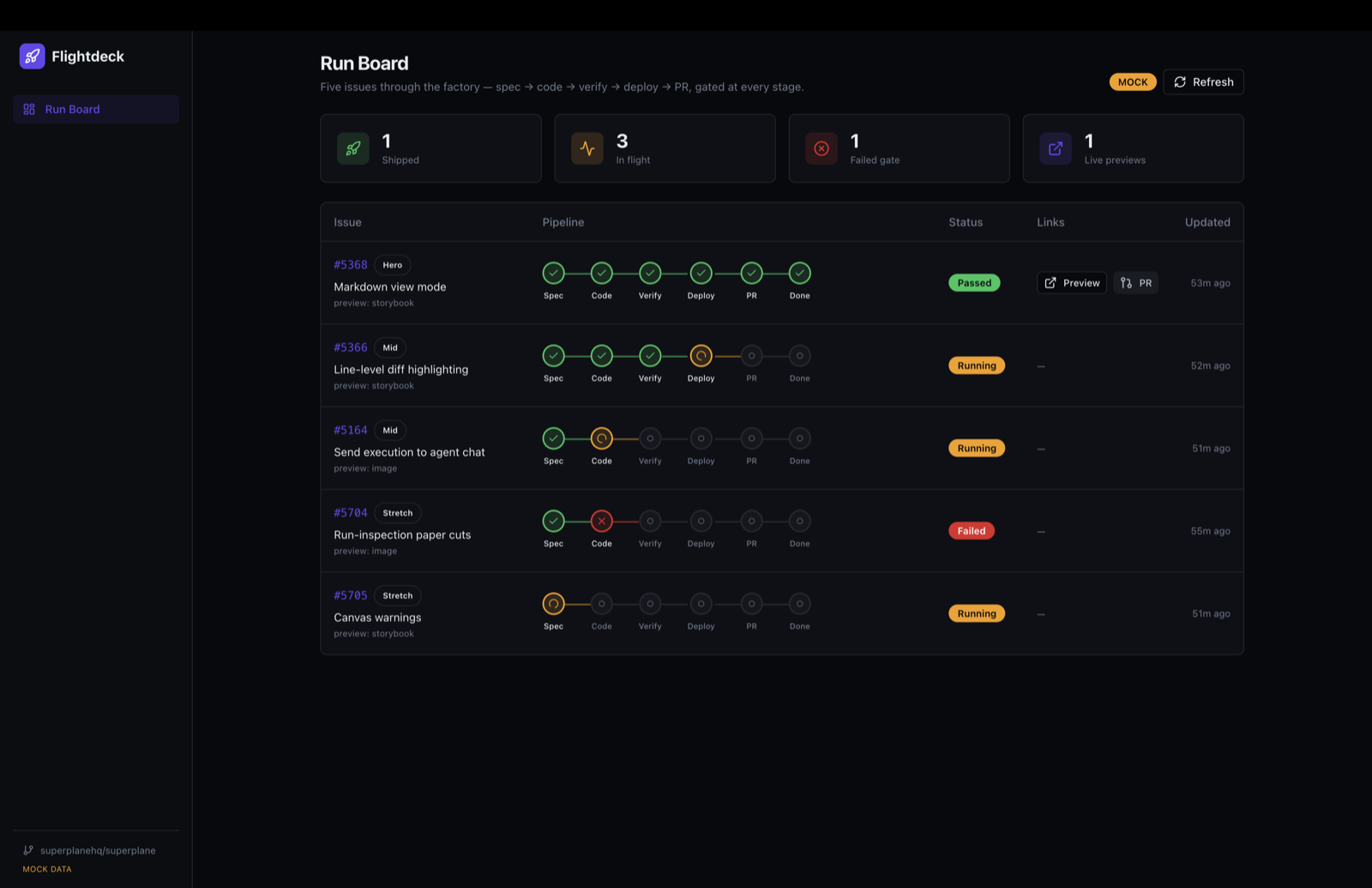
flightdeck-5368-preview-5368.onrender.comRender API · POST /v1/servicesWatch every request move through the factory, live
There's a single dashboard — the run board, hosted on Render — where you can watch all the requests at once. Each row is one request; the dots show which station it's reached and whether each checkpoint passed (green), is in progress (blue), or failed (red). This is exactly what a presenter points at to say "look — they're all moving on their own."
The same run information powers a built-in panel inside Superplane too, so the demo keeps working even if this custom board is unavailable.
A clickable preview on a tidy, proposed change
Here's the payoff a human actually receives. A pull request — the standard way developers propose a change for review — opens automatically, with the AI's summary and, most importantly, a green button linking to the live Render preview. One click and you're trying the real feature.
What's a "pull request"?
It's just the standard, polite way a developer proposes a change: "here's what I changed, here's why — take a look before it goes in." Nothing happens to the real project until a human approves it. Flightdeck opens one for you, fully filled in.
Click for detail →What's a "preview environment"?
A temporary, live copy of the feature you can click and try — its own web address on Render, separate from anything real. Like a test-drive car on the lot: fully functional, but safe to poke at. When you're done, it can be thrown away.
Click for detail →Five real feature requests went in — #5368 came all the way out
Flightdeck was tried on five genuine feature requests from a real open-source project. They all fire into the factory together; the easiest one was driven all the way to a shipped, real pull request and preview.
Flightdeck was built the way Flightdeck builds software
This whole thing — the orchestrator service, the Superplane factory canvas, the React run board, this very deck, the voiceover you can hear, even a standalone component preview — wasn't typed out by one person. It was assembled by an orchestrated fleet of AI coding agents: one main agent coordinating many specialized subagents in parallel, each scoped to a single job, each one's output verified before it was allowed into the build.
How it got built mirrors what it sells
Flightdeck productizes gated, multi-agent, spec → code → verify → deploy automation, where each stage is checked before the next begins. That's not a tagline we reverse-engineered — it's literally how the project in front of you came together.
How it was built
A main agent broke the work into pieces and handed each to a specialized subagent — one for the orchestrator, one for the canvas, one for the run board, one for this deck. They worked in parallel, and nothing was merged until it was checked.
See the fleet →What it productizes
The shipping product does the exact same thing on purpose: gated, multi-agent automation from spec to code to verify to deploy, with a checkpoint between every stage. The build process and the product are the same idea, one lived, one packaged.
See the mirror →Not a sandbox — it shipped to real infrastructure
The build wasn't a closed-doors simulation. It ran live and landed on real, public infrastructure you can go look at.
We tracked the build as it happened
Because the same gated approach was used to run the build, every stage left a trace. Here's the build of Flightdeck being tracked — by the very pattern Flightdeck automates.
superplane/canvas.yaml (15 stations, 21 links · live in Cloud) · render.yaml · docs/PROJECT_BRIEF.md · HANDOFF.md